
🤖
WeCom
使用 MCP 协议通过 Webhook 向 WeCom(企业微信)发送消息。适用于 Claude Code、Claude Desktop 和其他 MCP 客户端。
安全通过
🔌MCP
技能说明
---` name: wecom description: "Send messages to WeCom (企业微信) via webhooks using MCP protocol. Works with Claude Code, Claude Desktop, and other MCP clients."
WeCom Skill
Send text and markdown messages to WeCom (企业微信) via incoming webhooks (ENV: WECOM_WEBHOOK_URL).
WeCom is the enterprise version (using in office) of the famous all-in-on IM WeChat envied by Elon Musk.
Setup
# Navigate to skill directory
cd skills/wecom

# Install dependencies
npm install

# Build TypeScript
npm run build

# Set webhook URL
export WECOM_WEBHOOK_URL="https://qyapi.weixin.qq.com/cgi-bin/webhook/send?key=YOUR_KEY"
Usage with Claude Code
Add to your ~/.config/claude_code/mcp.json:
{
  "mcpServers": {
    "wecom": {
      "command": "node",
      "args": ["/path/to/clawdbot/skills/wecom/dist/index.js"],
      "env": {
        "WECOM_WEBHOOK_URL": "https://qyapi.weixin.qq.com/cgi-bin/webhook/send?key=YOUR_KEY"
      }
    }
  }
}
Then restart Claude Code. You'll have two new tools:
Tools
send_wecom_message
Send a text message to WeCom.
# Simple message
await send_wecom_message({ content: "Hello from OpenClaw!" });

# With mentions
await send_wecom_message({
  content: "Meeting starting now",
  mentioned_list: ["zhangsan", "lisi"]
});
send_wecom_markdown
Send a markdown message (WeCom flavor).
await send_wecom_markdown({
  content: `# Daily Report

**Completed:**
- Task A
- Task B

**Pending:**
- Task C

<@zhangsan>`
});
WeCom Markdown Tags
WeCom supports:
| Feature | Syntax |
|---|---|
| Bold | **text** or <strong>text</strong> |
| Italic | *text* or <i>text</i> |
| Strikethrough | ~~text~~ or <s>text</s> |
| Mention | <@userid> |
| Link | <a href="url">text</a> |
| Image | <img src="url" /> |
| Font size | <font size="5">text</font> |
| Color | <font color="#FF0000">text</font> |
Environment Variables
| Variable | Required | Default | Description |
|---|---|---|---|
WECOM_WEBHOOK_URL | Yes | - | WeCom webhook URL |
WECOM_TIMEOUT_MS | No | 10000 | Request timeout (ms) |
How To
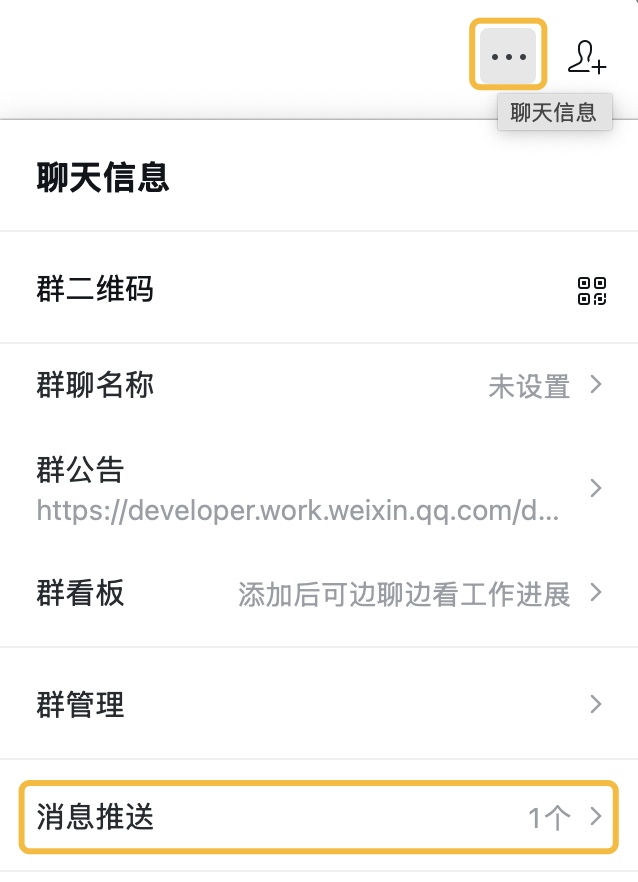
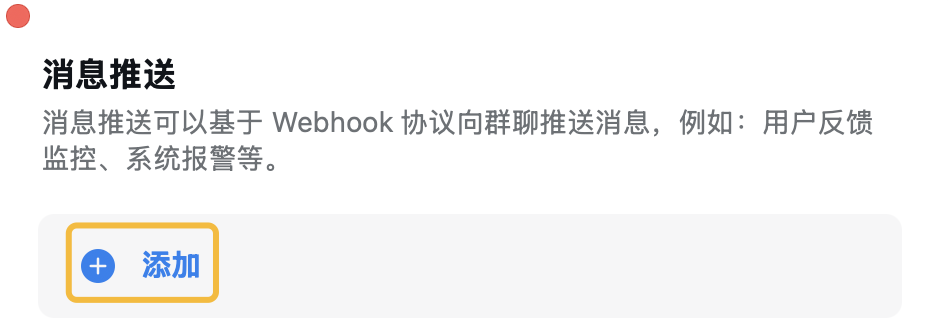
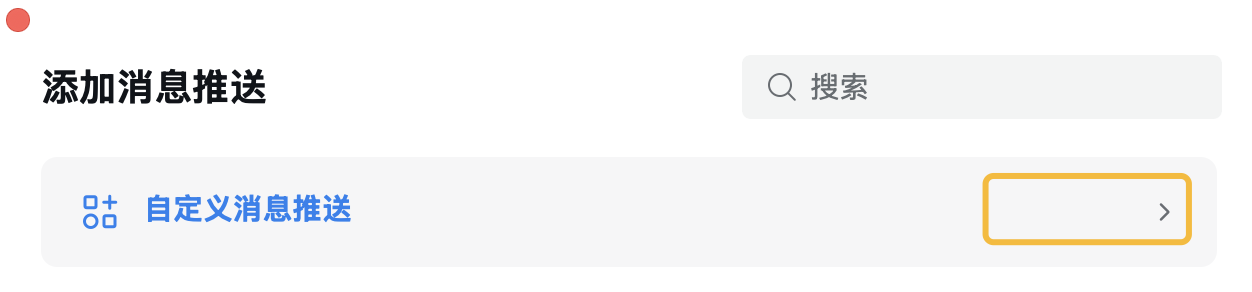
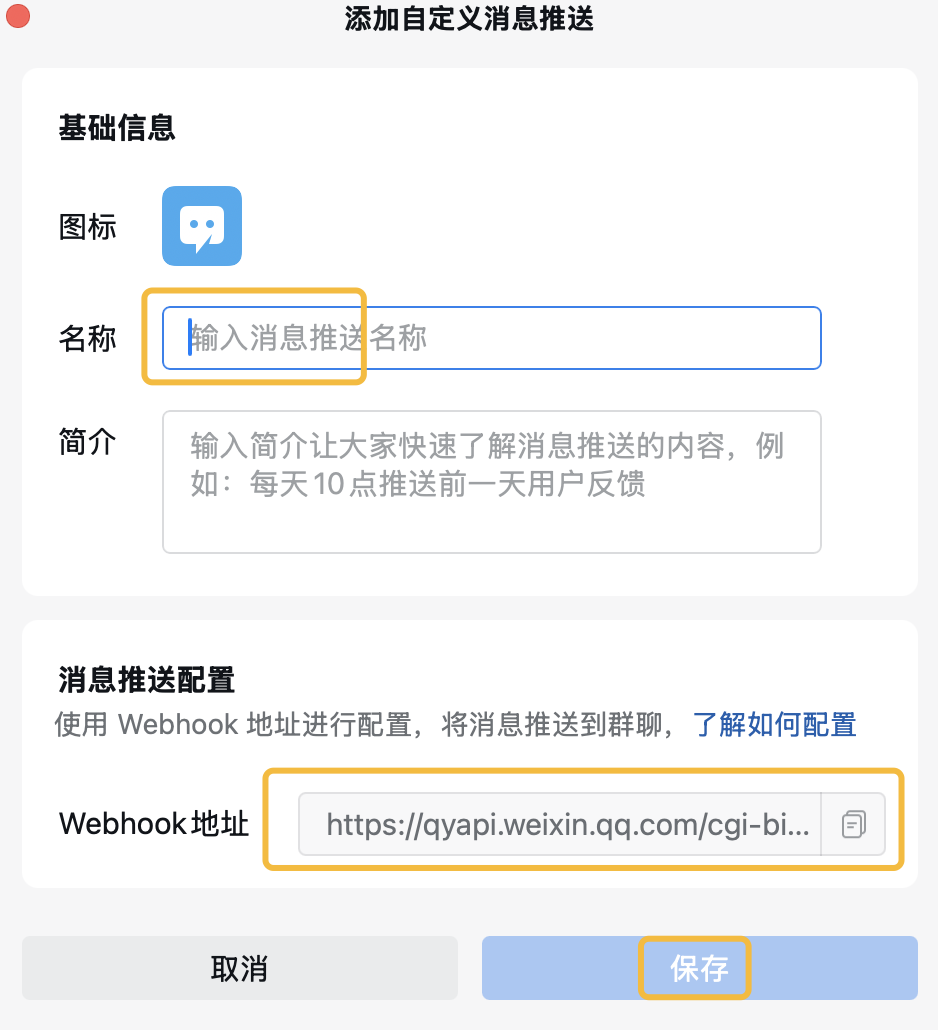
Get WECOM_WEBHOOK_URL following steps here, and envolve it as a bot into a group chat:
(Tip: You should get the WECOM_WEBHOOK_URL entirely as a URL, NOT just a KEY )
STEP 1
STEP 2
STEP 3
STEP 4
Reference
如何使用「WeCom」?
- 打开小龙虾AI(Web 或 iOS App)
- 点击上方「立即使用」按钮,或在对话框中输入任务描述
- 小龙虾AI 会自动匹配并调用「WeCom」技能完成任务
- 结果即时呈现,支持继续对话优化